How to check if WordPress plugins & themes are up to date in 2026?
Checking WordPress plugins and themes for updates is essential for site security and performance in 2026. This comprehensive guide walks you through manual, automated, and advanced methods to stay current and avoid vulnerabilities.
Why updates matter in 2026
Updates patch security holes, boost speed, and ensure compatibility with WordPress 6.6+ features like improved block editor and AI-assisted rollback. Outdated plugins account for over 80% of WordPress hacks, with attackers exploiting known flaws via automated bots. Regular checks prevent downtime, SEO drops from slow sites, and compliance issues with PHP 8.3 standards.
Fresh themes align with Full Site Editing (FSE), delivering better mobile scores and Core Web Vitals that Google prioritizes. Our WordPress agency sees clients save thousands yearly by proactive maintenance over reactive fixes.
Checking via wp-admin dashboard
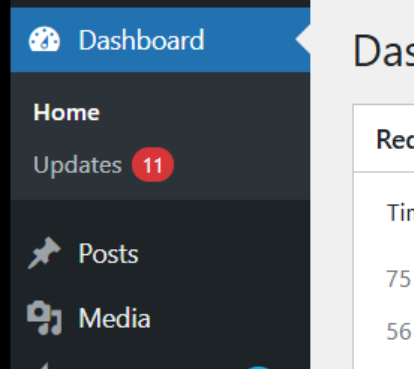
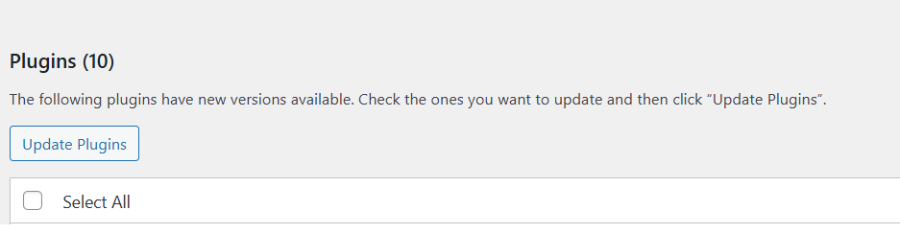
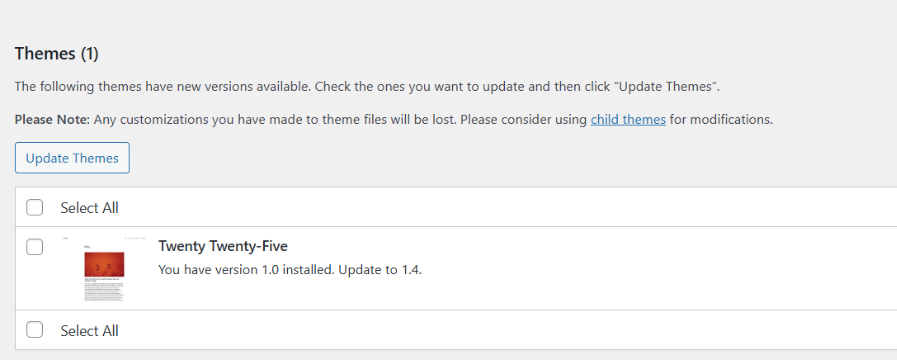
Access your WordPress dashboard and spot the update icon – a red bubble shows pending core, plugin, or theme updates. Click “Updates” in the left menu for a full list: plugins first, then themes, with version details and changelogs. Hover over “Update now” to preview notes; bulk select for faster action.
This method suits solo bloggers but misses multisite nuances – switch sites via top bar. Enable auto background updates since WP 5.5 for minor releases, but review majors manually to dodge breaking changes.
Using WP-CLI for developers
WP-CLI shines for agencies managing dozens of sites – install via SSH, then run wp plugin list to scan active plugins with versions and update status. Use wp plugin update –all for bulk updates or wp theme list for themes; add –dry-run to simulate first.
For cron jobs, script wp core check-update –plugins –themes daily, piping output to logs. Ideal for headless setups or staging servers, it bypasses browser limits and integrates with Git workflows.
Automated monitoring tools
Plugins like MainWP or InfiniteWP centralize checks across client sites, sending email alerts for updates. Install a dashboard plugin, connect child sites, and view a unified update queue with one-click deployment.
Better yet, use hosting-built tools: Cloudways or Kinsta offer update notifications via app dashboards, with staging previews. For security-first, WP Umbrella or Jetpack Scan flags outdated items alongside malware checks.
You can also check our Brand Monitoring tool, which automatically checks the website for availability and any errors.
Setting up email notifications
Add the WP Crontrol plugin to schedule wp_version_check() cron jobs, triggering emails via wp_mail() on new versions. Code snippet in functions.php: hook auto_core_update_sent for custom alerts to admin emails.
Plugins like Better Notifications for WP customize messages with plugin names, urgency levels, and rollback links. Multisite admins love Plesk or cPanel extensions for server-wide scans emailed weekly.
Enabling automatic updates safely
WordPress auto-updates plugins/themes since 5.5 – toggle via Plugins > Installed Plugins > Enable auto-updates per item. Use Easy Updates Manager plugin for granular control: whitelist trusted plugins, blacklist risky ones.
Pros: instant patches for zero-days. Cons: potential incompatibilities breaking layouts. Test on staging first; our agency enables for 90% of core plugins but manuals majors.
Handling premium plugins and themes
Premium items update via developer accounts – Envato (ThemeForest) uses a license checker in dashboard; log in to see updates. For individual devs like Elementor Pro, enter license keys under plugin settings to fetch updates.
Manual ZIP uploads risk mismatches – always download fresh from accounts. Pro tip: use WP Patcher for offline checks on air-gapped sites.
Risks and best practices
- Major updates can break child themes – diff changelogs for jQuery or CSS shifts. Always backup with UpdraftPlus before bulk actions; rollback via WP rollback plugin if issues arise.
- Schedule off-peak: use Server Timing headers to verify post-update performance. Audit inactive plugins quarterly – deactivate and delete to shrink attack surface.
- Prioritize by risk: security plugins (Wordfence, Sucuri) first, then SEO (Yoast), e-commerce (WooCommerce) last after staging tests.
Hosting and agency solutions
Managed hosts like WP Engine, SiteGround or Kinsta automate minor core, plugin and theme updates, with customizable delays up to 72 hours for majors via their dashboards. SiteGround’s DevTools notifies via email or app, including plugin scans during WP updates, while WP Engine’s User Portal logs every change with rollback one-clicks. These save hours weekly, especially for e-commerce sites where downtime costs sales.
Agencies scale effortlessly with ManageWP – connect unlimited sites to a central dashboard for bulk updates, uptime monitoring and SEO audits. Client portals in ManageWP display real-time update histories, compliance checklists and branded reports, letting clients approve changes self-service. Integrate with tools like UpdraftPlus for pre-update backups across fleets.
For 2026, top agencies use solutions like our Brand Monitoring services
Troubleshooting common issues
“Update failed” errors stem from file permissions – SSH in and run chmod 755 wp-content/plugins/ then chown www-data:www-data wp-content/plugins/ for ownership. If persistent, clear transients via wp transient delete –all in WP-CLI or phpMyAdmin’s options table.
Plugin conflicts? Health Check & Troubleshooting plugin lets you troubleshoot in incognito mode: deactivate all but must-haves, update, reactivate one-by-one while testing frontend. For theme lockouts post-update, edit wp_options via phpMyAdmin: set template and stylesheet to ‘twentytwentyfour’.
Multisite quirks? Use Network Admin > Updates for globals; per-site via sub-site dashboard. Fix 403s by verifying .htaccess rewrites and mod_rewrite enabled. Here’s a functions.php snippet for update email notifications:
// Enable plugin and theme auto-update emails

add_filter( 'auto_plugin_update_send_email', '__return_true', 11 );

add_filter( 'auto_theme_update_send_email', '__return_true', 11 );
This sends detailed logs to admin email on auto-updates.














![How to Fight AI Hallucinations About Your Brand [ready-to-use prompt inside]](https://www.createit.com/wp-content/uploads/2026/02/How-to-Fight-AI-Hallucinations-355x200.jpg)